
Corporate AI

An internal AI platform your people can use safely and your organization can control.

Available as SaaS
AI AgentSecurityCloud Native

Ready to use as SaaS

Systems we build and run ourselves. Subscribe instead of building your own.

Corporate AI: sign up, get your username by email, sign in and start using your organization's AI

See each feature at work

Short clips from the real product, from everyday work for staff to the tools admins use.

01 · For staff

Mail AI

Read a long email in one line, then let AI draft a reply from the thread in the tone and length you pick. You check it before it goes.

  • An AI summary on every email
  • Write with AI drafts from the thread, with quick prompts such as confirm, ask for time or schedule a call
  • Professional, friendly or concise tone, and a short, medium or detailed length
02 · For staff

Meet AI

Schedule and join online meetings from one page. When a meeting ends, AI writes the overview, key points, decisions and action items with their owners.

  • Meeting summary: overview, key points and decisions
  • Action items with an owner and a due date
  • How much of the time each participant spoke
03 · For staff

Create Studio

Describe what you need and AI makes the image or short video, such as a recruitment post, a website banner or a product shot.

  • Ready-made prompts for common work, one click to start
  • 1:1, 16:9 or 9:16, at the resolution you choose
  • Short videos with sound, and reference images
04 · For admins

Guardrails

Admins decide whether each kind of personal data is masked, blocked or only detected before a message reaches the model, test the rules on real text before turning them on, and see what was blocked.

  • Address, age, name, email, phone, and your own regex rules such as Thai national IDs
  • Test a message and see the result before going live
  • Versioned, for the whole organization or per group, with an activity log
From the running system
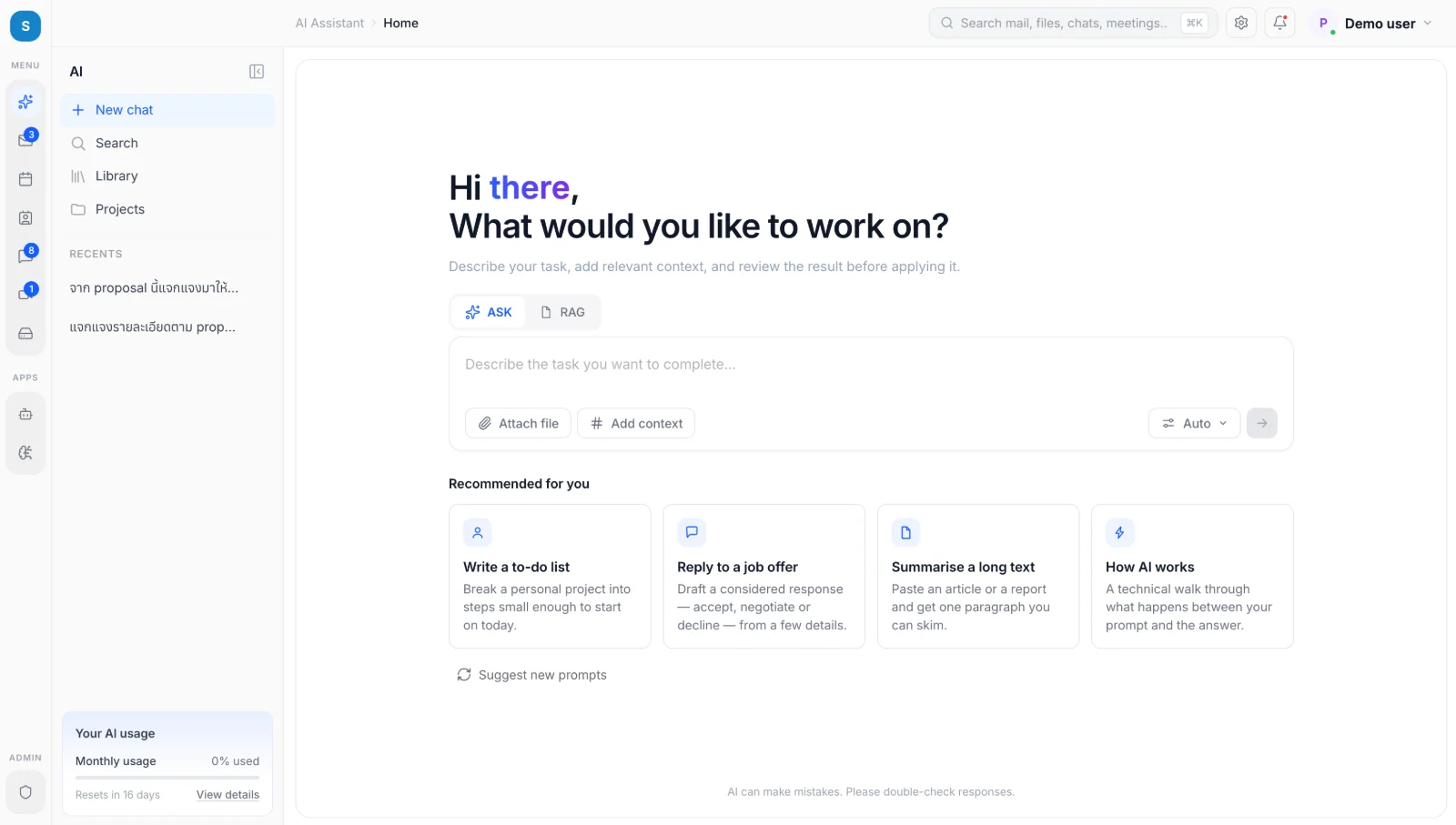
Corporate AI home: a task box with Ask and RAG modes, file and context attachments, suggested tasks, and a monthly AI usage panel
A screen from a system we built. Names of people and organizations have been replaced with sample data.
The problem

People paste company data into personal AI accounts. You cannot see what leaves, or control what it costs.

The outcome

Everyone uses AI through one system with company sign-in, every use is logged, and each department has a budget.

Who it is for

Organizations where AI use has started on its own

You need a sanctioned way in, not a ban.

IT teams serving many departments

You need access and spend controlled in one place.

Businesses with data obligations

You need to choose where data is processed.

How it works

  1. Sign in with SSOYour existing accounts, such as Microsoft Entra ID or Google Workspace
  2. Pick a mode and contextAsk for general tasks or RAG for answers from your documents, with files and context attached
  3. Check before sendingPersonal data is filtered according to your policy
  4. Route to the right modelPick one, or let Auto choose by task and budget
  5. Review before usingPeople review the result before applying it; every use is logged and costs are reported per department

Capabilities

Company sign-in

SSO with permissions by user group

Ask and RAG modes

General tasks, or answers from your documents with citations

Files and context

Attach files and bring relevant context into a task

Model choice

Pick one or let Auto choose. Not tied to one provider, and your data is not used for training

Budgets and quotas

Department limits, a monthly usage view for each person, and alerts before limits are reached

Projects

Keep related chats and work together in one project

Shared prompt library

Share prompts that work across teams, with suggested prompts to start from

Audit log

See who used what, and when

Internal knowledge

Extends into a knowledge base when you are ready

Measured

What we measure with you

Targets are agreed during Discovery, and real results are reported after the pilot.

  • KPI 1Weekly active users
  • KPI 2Cost per user
  • KPI 3Share of AI use that goes through your platform
Your data, your control

Deployment options

Who operates itWhere data livesBest for
Managed cloudWe operate everythingA region you chooseFastest start, no infrastructure team needed
Your cloudWe deploy into your cloud accountStays in your accountOrganizations with an existing cloud policy
On-premiseInstalled in your data centerNever leaves your premisesData with the strictest requirements
Questions?Wehaveanswers.

Find out how ready you are for AI

Answer 13 questions in about 5 minutes. You get a readiness score across 6 areas and a first scope to start from.

Assess your AI readiness